- Our Work
- Industries We Serve
- Services We Deliver
- Why Work with Us
- Our Thinking
- News
- Insights
- 5 Ways Design Systems Create Business Value
- 5 Ways to Make Your Nonprofit Engage Using Facebook Timeline
- 6 Great Interactive Data Visualization Tools (Part 1)
- 6 Great Interactive Data Visualization Tools (Part 2)
- Announcing the First Brands Behaving Badly Awards
- April 16, 2012
- April 2, 2012
- April 23, 2012
- April 30, 2012
- April 9, 2012
- Best of 2011 Roundup
- Brands Behaving Badly, Summer 2010 Bronze Medalist, Lebron James
- Brands Behaving Badly, Summer 2010 Gold Medalist, BP
- Brands Behaving Badly, Summer 2010 Silver Medalist, Toyota
- DIY Communications: Multitasking Your Way to a Mediocre Brand
- February 13, 2012
- February 21, 2012
- February 27, 2012
- February 6, 2012
- Five Things to Consider as You Dive Into Responsive Web Design
- Getting High on Your Own Supply
- Intervention: Identity Crisis Edition
- Invest in Partners, Not Products
- Is Your User Experience Degrading Your Brand?
- January 16, 2012
- January 30, 2012
- July 16, 2012
- July 2, 2012
- July 23, 2012
- June 11, 2012
- June 18, 2012
- June 4, 2012
- Labeling for Good: White Paper
- March 12, 2012
- March 19, 2012
- March 26, 2012
- March 5, 2012
- Maximizing Design Firm Relationships During the Budgeting Process
- Maximizing Design Firm Relationships by Managing Stakeholder Input
- Maximizing Design Firm Relationships by Setting Appropriate Success Metrics
- May 14, 2012
- May 21, 2012
- May 29th, 2012
- May 7, 2012
- Putting Pinterest to Work for Your Business or Nonprofit Brand
- Putting Pinterest to Work for Your Business or Nonprofit Brand Part 2
- Responsive Design Planning: More Than a Line Item
- Rethinking the Traditional Policy Report
- Show Your Nonprofit's Brand a Little Love!
- Speaking a Client's Language
- State of the State of the Union: Power(Point) to the People?
- Stepping Back From Komen's Brand Disaster
- Storytelling for Business: The Infographic!
- The 5 Benefits of Designing a Consistent Brand
- The Fundamentals of Developing a Strong Brand
- The Website RFP - Basic Best Practices for Small Businesses and Non-Profit Organizations
- Three Ways for Nonprofits to Maximize Design Firm Relationships
- Three Ways to Future-Proof Your Content Management System
- Web Typography Part 1
- Web Typography: An Important Way to Strengthen Your Brand Online (Part 2)
- All
Putting Pinterest to Work for Your Brand (Part 2)
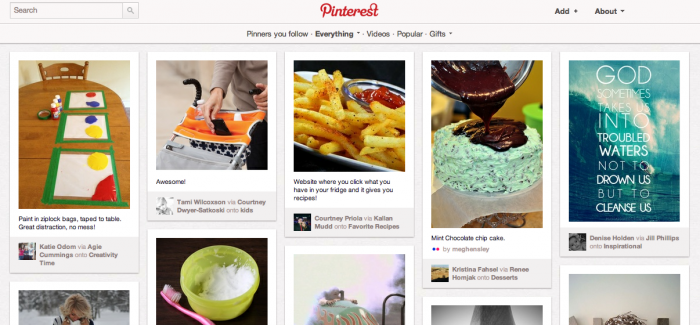
In last week’s introduction to Pinterest, I discussed how businesses and nonprofit organizations should approach using Pinterest to better target audiences, create a brand presence, and ultimately motivate audiences to act. In this week’s continuation, I’d like to discuss some of the more pragmatic issues you should be aware of like making the most of Pinterest’s viral nature, using analytics to track and measure your traffic, and legal issues that have recently cropped up regarding social image sharing.
Make It Go Viral
Like any good social media platform, the point of Pinterest is to garner user engagement and to help your brand go viral. So, be inviting! To make it easy for visitors to your site to add your images directly to their own pinboards, add the “Pin It” button next to the Facebook “Like” and Twitter “Follow” icons. Use hashtags on pins, like you would on Twitter, to tap into themes people are interested in, to better organize your content, and increase the chances that your pin will be found in a search.
This concept of repinning is an important aspect of leveraging broader themes to tie your brand into appropriate themes your audience finds meaningful. Remember, Pinterest is give and take, meaning that while you must pin original content, you should also repin, like, or comment on relevant content from others in order to engage with the community rather than just broadcasting your message. No one likes the guy filibustering with a megaphone. Become a part of the community and you will reap greater rewards.
Track Your Traffic
If you’re not paying attention to your traffic, it’s worthless. As with any social media site it’s important to stay on top of what kind of traffic you’re generating so that you can adjust to start attracting the kinds of audiences you’re looking to connect with. Work with traffic by driving it to landing pages and through a conversion path. You probably already use Google Analytics, and the good news is, it works really well tracking Pinterest.
If you’re not that familiar using Google Analytics, to see how many of your website visits are from Pinterest, simply make a Referrals Report to see how much of your Pinterest activity is leading to conversions. You can also create a Custom Report of important information for specific purposes—use Google Analytics’ dashboard, for example to monitor key areas of importance such as daily visits, time spent on the page, user interfaces, etc. G.A.’s dashboard puts everything together to make it easier for you to see what is succeeding and what isn’t. But don’t rely on the dashboard alone to evaluate how many of your Pinterest visits convert into conversions, because it uses last click attribution, meaning Pinterest only gets credit when it’s the last source of the visit. Instead, use Google Analytic’s Multi-Channel Funnels report to get a more in depth view of how Pinterest is driving your sales or donations.
Beware of Copyrights
While social media platforms still feel like the Wild West of content authorship, it’s a good idea to remember that whenever you’re pinning an image or video that is not your own, you are opening yourself up to copyright infringement. The latest Pinterest controversy has been over this very issue—and we imagine it’ll probably increase as Pinterest gains in popularity. This has led to many users cancelling their accounts to avoid lawsuits.
But fear not, there are ways to legally pin content that isn’t yours. morgueFile is a great service that offers free photos which don’t even need to be credited. More commonly, however, are photos that fall under the Creative Commons. Yahoo Inc.’s Flickr hosts many photos under various forms of the Creative Commons, each with their own usage rules but always requiring a credit. Not all photos are eligible since Flickr and other venues offer photo-sharing users an opt-out code to disable their image sharing. Pinterest allows content owners to report violations and get the content removed in order to deal with this issue. The best way to handle this matter as a business or organization is to only put up content you’ve created or images of photos you’ve taken.
I hope these last 2 articles have given you a good primer on how to put Pinterest to work for your brand. All in all, while it’s still early in the game for Pinterest, we think it’s is an excellent medium for businesses and nonprofits to help leverage their brand equity in a social environment, connect with audiences on an emotional, visual level, gain a following, and ultimately create action.
InsightsDesign Thinking For Sustainable Social Change
NewsNonprofit Technology Network Publishes MSDS DataViz Feature
InsightsWriting Effective Impact Stories for Nonprofits